A Complete Guide to ChatGPT (2026)
ChatGPT has changed more in 2026 than in any year since its launch. GPT-6 arrived in October, the free plan gained unlimited text chat in August, and new tools such as ChatGPT Work, Sites, Slides and Health turned the familiar chatbot into a full digital workspace.
For newcomers, the number of plans, models and features can feel overwhelming. Even long-time users often miss upgrades that quietly appeared in the app.
This guide covers everything in one place: what ChatGPT is, which models power it, what each plan costs, how every major feature works, and how to get consistently better answers.
It also covers privacy settings, common limitations and how ChatGPT compares with rivals such as Claude, Gemini and Microsoft Copilot. Details are current as of October 2026 and drawn from OpenAI's own release notes and help pages wherever possible.
What Is ChatGPT?
ChatGPT is an AI assistant built by OpenAI, the San Francisco research company behind the GPT family of language models. It understands questions written in everyday language and responds with text, images, charts, documents and interactive tools.
OpenAI released ChatGPT to the public on 30 November 2022. It became one of the fastest-growing consumer apps in history, and by September 2026 it ranked as the fifth-most-visited website in the world.
The product has evolved in clear stages. Early versions simply chatted. Later releases added web browsing, image understanding, voice conversations, file analysis and memory.
The GPT-5 family, launched in August 2025, merged fast replies and deeper reasoning into one system. In 2026 the focus shifted to agents: tools that can research, browse websites, use connected apps and deliver finished work with limited supervision.
Today ChatGPT is available on the web at chatgpt.com, on iOS and Android, in a desktop app for macOS, Windows and Linux, and inside apps such as Microsoft Word, Excel, PowerPoint and Google Sheets. It even runs in Apple CarPlay and on WhatsApp in many countries.
ChatGPT Models in 2026: GPT-6 Explained
On 7 October 2026, OpenAI began rolling out GPT-6 to everyone in ChatGPT, replacing the GPT-5.6 models in the main Chat tab, according to the official ChatGPT release notes.
The new generation comes in three main versions, and the GPT model hub tracks benchmarks and context windows for each.
| Model | Who gets it | What it is for |
|---|---|---|
| GPT-6 Luna | Free and Go users | Fast everyday conversation at low cost |
| GPT-6 Sol | Plus, Pro, Business and Enterprise | The default paid model, from instant replies to extra-high reasoning |
| GPT-6 Astra | Pro reasoning option, Work and Codex | OpenAI's most capable model for coding, research, computer use and complex multi-step work |
| GPT-6.1 Sol | ChatGPT Work and Codex | An upgrade to Sol focused on agentic coding and professional tasks |
Intelligent UI. GPT-6 arrived with a feature OpenAI calls Intelligent UI. Instead of replying only in text, ChatGPT can mix in diagrams, side-by-side comparisons, charts and small working tools such as calculators or bill splitters.
It also starts answering while it is still thinking or using tools, then adds new findings as it goes.
Thinking levels. Paid users choose how hard ChatGPT should think from the model picker in the message box: Instant, Medium, High, and on Pro plans Extra High and Pro options.
Free and Go users get a Think button for harder questions. More thinking produces better answers on complex problems but takes longer and uses more of the allowance.
Older models. OpenAI generally keeps a previous model available for about 90 days after its successor launches. Models such as GPT-4o, GPT-4.5 and OpenAI o3 have now been retired from ChatGPT, although some remain in the developer API.
ChatGPT Plans and Pricing (October 2026)
ChatGPT now sells access in more tiers than ever, from a genuinely useful free plan to a $500-a-month power tier. US prices below exclude tax; Go and some other prices vary by country.
| Plan | Price (USD) | Best for | Highlights |
|---|---|---|---|
| Free | $0 | Casual users | Unlimited text chat on GPT-6 Luna, Think button, limited images, files and voice; ads in some countries |
| Go | $8/month (varies by region) | Budget daily users | More uploads, images and memory than Free; ads in some countries |
| Plus | $20/month | Most regular users | GPT-6 Sol, deep research, ChatGPT Work, Sites, Codex, audio uploads, no ads |
| Pro 100 | $100/month | Heavy users | About 5x Plus usage, GPT-6 Astra Pro reasoning, larger context |
| Pro 200 | $200/month | Power users | About 20x Plus usage, unlimited GPT-Live voice |
| Pro 500 | $500/month | Extreme workloads | Highest included usage plus Astra Ultrafast in Work and Codex |
| Business | $20/seat/month annually, $25 monthly; Premium seats cost more | Teams of two or more | Shared workspace, SSO, admin controls, no training on business data by default |
| Enterprise | Custom | Large organizations | SCIM, data residency, analytics, advanced compliance |
Key 2026 changes shaped this lineup. Go launched worldwide at $8 in January, a $100 Pro tier arrived in April, Business prices dropped by $5 in April, and OpenAI added the $500 Pro tier with Astra Ultrafast on 29 September.
Which plan makes sense?
Free now covers most casual users, since text chat became unlimited in August. Plus at $20 remains the sweet spot for professionals who want the stronger Sol model, deep research, ChatGPT Work and an ad-free experience.
Pro only pays off for people who hit Plus limits regularly, often through heavy Codex or Work use. Teams of two or more usually get better value and stronger data guarantees from Business than from several separate Plus accounts.
Special programs also exist. ChatGPT for Teachers is free for verified US K-12 educators through June 2027, ChatGPT for Clinicians is free for verified US clinicians, and nonprofits can receive discounts on Business and Enterprise.
Every Major ChatGPT Feature Explained
ChatGPT's interface is split into Chat for quick questions and conversation, and Work for longer tasks that end in a finished deliverable. Developers also get Codex. These are the features worth knowing in each area.
Everyday chat tools
- Web search. ChatGPT searches the web when a question needs current information and shows its sources.
- File and audio uploads. PDFs, spreadsheets, images and documents can be summarized, compared and analyzed. Paid plans can now upload audio recordings for transcripts and meeting notes.
- Images. ChatGPT Images 2.5 creates and edits pictures from text, sketches or templates. It can also generate sticker packs and virtual clothing try-ons. Dedicated AI image generation tools offer more artistic control.
- Voice. ChatGPT Voice, powered by GPT-Live, can listen and speak at the same time for natural conversation. It works with files, projects and plugins, and runs hands-free in Apple CarPlay.
- Memory. ChatGPT remembers useful details across chats, such as preferences, ongoing projects and goals. A memory summary shows what it knows, and every entry can be edited or deleted.
- Projects and Library. Projects group related chats, files and instructions. The Library stores every uploaded or created file, and Google Drive, Box, Dropbox and SharePoint can be connected to it directly.
- Learning tools. Interactive quizzes and flashcards help students revise any topic.
Deep research and agents
- Deep research. For complex questions, ChatGPT spends several minutes reading many sources and returns a detailed, cited report. Specialist AI research and search tools can complement it.
- ChatGPT Work. Launched in July 2026, Work is an agent that researches, uses connected apps and files, browses websites and delivers finished documents, spreadsheets, presentations and reports. It asks for confirmation before important actions such as payments.
- Scheduled tasks. ChatGPT can run reminders, recurring briefings or monitoring jobs on a schedule, and on paid plans can react to events such as a new Gmail message.
- Dots. Rolling out to Pro and Business Premium users, dots are always-on agents with their own cloud computer that keep working on a goal between conversations.
Creation tools
- Sites. Plus and higher plans can turn ideas into interactive websites, dashboards and lightweight apps, then publish or share them.
- Slides and Pages. Collaborative presentations and documents live in ChatGPT Space, with real-time editing and export to PowerPoint, PDF or Google Slides. Other AI presentation tools focus purely on slide design.
Apps, plugins and integrations
- Plugins. Plugins connect ChatGPT to services such as Gmail, Outlook, Notion, Slack, GitHub and Zendesk, and can package reusable skills. OpenAI has announced that custom GPTs will be retired and migrated to plugins.
- Office add-ins. ChatGPT works inside Microsoft Word, Excel and PowerPoint, as well as Google Sheets.
- Browser extension. An extension for Chrome, Edge, Brave, Opera and Vivaldi lets ChatGPT use open tabs as context. The standalone Atlas browser was retired in August 2026.
Personal life features
- Health. US users can connect medical records and Apple Health data to understand lab results and prepare for appointments. OpenAI states that this data is not used to train its models.
- Finances. US users can connect bank accounts and credit scores to track spending and plan budgets.
- Shopping, jobs and reservations. ChatGPT compares products, finds live job listings, formats resumes and books restaurant tables through OpenTable, Resy and Yelp.
Codex for developers
Codex is OpenAI's coding agent. It writes and reviews code, runs tests, controls apps through computer use, and continues tasks in the cloud while a laptop sleeps.
It is available in the desktop app, IDEs, the command line and the mobile app, with usage tied to the ChatGPT plan. Alternatives are compared in the AI coding tools directory.
How to Get Started With ChatGPT: Step by Step
Setting up ChatGPT properly takes about ten minutes and pays off in every later conversation. The diagram shows the one-time setup and the loop that every task follows afterward.
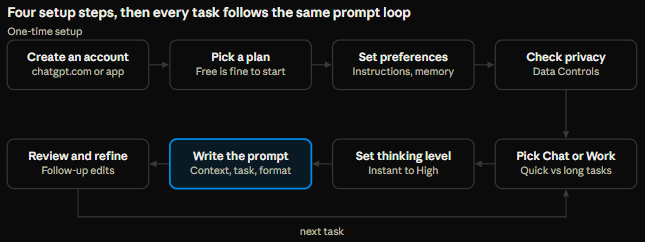 Step 1: Create an account. Sign up free at chatgpt.com or in the iOS, Android or desktop app, using an email address, Google, Microsoft or Apple account.
Step 2: Pick a plan. Free is enough to learn the basics. Upgrading later takes seconds from Settings, and plans can be cancelled at any time.
Step 3: Set preferences. Under Settings > Personalization, custom instructions describe the user's role, interests and preferred tone. Memory can stay on for convenience or be turned off for more privacy.
Step 4: Check privacy. In Data Controls, users decide whether their chats help improve OpenAI's models. Turning on two-factor authentication or passkeys is also wise.
The everyday loop. For each new task, users choose Chat for quick help or Work for longer jobs, pick a thinking level, write a clear prompt, then refine the answer with short follow-ups. Over time, projects, plugins and scheduled tasks make the loop even faster.
Prompting Tips to Get Better Answers From ChatGPT
The biggest difference between frustrating and impressive ChatGPT results is the prompt. Experienced users rely on a handful of habits, and the Learn section covers prompt engineering in more depth.
- Give context first. A request such as "write a product description" produces generic copy. Adding the audience, the product's main benefit and the brand voice produces something usable on the first try.
- State the format. Asking for a table, a 150-word summary, five bullet points or a downloadable spreadsheet saves time on rewriting.
- Share examples. Pasting a past email that worked well, or a paragraph in the desired style, teaches ChatGPT faster than any description.
- Match the thinking level to the task. Instant suits quick facts and casual chat. Medium or High suits analysis, maths, planning and coding. Using Extra High for a simple question only wastes time.
- Iterate instead of starting over. Short follow-ups such as "make it friendlier," "cut it by half" or "add sources" refine a draft quickly.
- Ask it to ask questions. Ending a prompt with "ask any clarifying questions before starting" surfaces missing details early.
- Use custom instructions. Paid users can save up to 5,000 characters describing their role, preferred tone and formatting rules, so every chat starts with that background.
- Organize with projects. Keeping files and instructions for a recurring job, such as a weekly newsletter, in one project avoids re-explaining the brief every time.
- Request sources for facts. Asking ChatGPT to search the web and cite sources makes claims easy to verify.
- Hand long jobs to Work. When a task needs research across many sites, several files or a finished deck, ChatGPT Work usually beats a long back-and-forth chat.
Real-World ChatGPT Use Cases
ChatGPT's value depends on how it fits into daily routines. These examples show how different groups use it in practice.
Students upload lecture notes and turn them into flashcards or practice quizzes, ask for step-by-step explanations of maths problems, and use deep research to find credible sources for essays.
The most effective students use ChatGPT as a tutor that explains, not a machine that writes assignments for them. More study aids appear in the AI education tools category.
Office professionals draft and polish emails, summarize long reports, prepare meeting agendas and turn rough notes into slide decks with ChatGPT for PowerPoint. Connecting Gmail or Outlook lets ChatGPT find past messages and draft replies in context.
Small business owners write product descriptions, social posts and newsletters, analyze sales spreadsheets in Excel or Google Sheets, and build simple internal dashboards with Sites.
A recurring scheduled task can deliver a Monday-morning summary of key metrics. The AI business tools directory lists options for finance, compliance and operations.
Marketers and content creators brainstorm campaign ideas, outline SEO articles before writing them, generate on-brand images and repurpose one long piece into many short posts. ChatGPT Work can research competitors across dozens of websites and return a structured report.
Developers use Codex to write features, fix bugs, review pull requests and scan repositories for security issues, often running several tasks in parallel in the cloud.
Everyday users plan trips, compare products, book restaurant tables, practice a new language through voice conversation, track spending through Finances and prepare questions before a doctor's appointment using Health.
Privacy, Safety and Limitations
ChatGPT is powerful, but careful use protects both accuracy and personal data. The guide Read This Before You Use Any AI Tool covers safe AI habits in more detail.
Privacy controls worth knowing
- Model training opt-out. On personal plans, conversations may be used to improve OpenAI's models unless the setting is turned off in Data Controls. Business and Enterprise plans do not train on business data by default.
- Temporary chats. These stay out of chat history and, by default, do not use or create memories.
- Locked chats. Added in October 2026, locked chats hide selected conversations behind a PIN or device authentication.
- Memory controls. Users can review, edit or delete individual memories, or turn memory off entirely.
- Privacy Center. A single page in Settings explains chat privacy, memory, data use, connected apps and account security.
- Account security. Two-factor authentication, passkeys, Advanced Account Security, active-session controls and a security history page help prevent account takeover.
- Lockdown Mode. An optional setting limits web access and external services to reduce the risk of prompt-injection attacks.
Known limitations
- Mistakes still happen. ChatGPT can state wrong facts with confidence. Important figures, legal points and medical information should always be checked against primary sources.
- Usage limits apply. Even paid plans cap heavy features such as deep research, images, Work and Codex, and the limits change often.
- Ads on lower tiers. Free and Go users in the US, UK, Canada, Australia and New Zealand may see ads. Plus and higher plans are ad-free.
- Regional differences. Several features, including Health, Finances and some agent tools, launch first in the US or exclude the EEA, UK and Switzerland.
- Not a professional adviser. Health and finance features are designed to support, not replace, doctors, accountants and financial advisers.
ChatGPT vs Claude vs Gemini vs Copilot
The leading AI assistants now offer strikingly similar price ladders, so the real differences lie in models, tools and ecosystems.
| ChatGPT | Claude | Google Gemini | Microsoft Copilot | |
|---|---|---|---|---|
| Maker | OpenAI | Anthropic | Microsoft | |
| Free plan | Yes, with ads in some countries | Yes | Yes | Yes |
| Standard paid tier | Plus, $20/month | Pro, $20/month or $17/month annually (pricing) | AI Pro, about $19.99/month | Bundled with Microsoft 365 plans |
| Power tiers | Pro $100, $200, $500 | Max $100 and $200 | AI Ultra tiers | Business and enterprise plans |
| Known strengths | Widest feature range, voice, images, Work agent, Codex | Writing quality, long documents, Claude Code for developers | Deep Google Search, Gmail and Docs integration | Built into Windows, Word, Excel, Outlook and Teams |
The right choice usually depends on existing tools. People who live in Google Workspace often prefer Gemini, Microsoft 365 organizations lean toward Copilot, and developers frequently compare Codex with Claude Code.
Many professionals keep a free account on two assistants and compare answers on important tasks. Detailed head-to-heads are available for ChatGPT vs Claude and ChatGPT vs Gemini, and the live AI rankings show which tools are gaining ground.
Prices for Gemini and Copilot change often and vary by region, so the official pricing pages are the best place to confirm current figures.
Frequently Asked Questions About ChatGPT
Is ChatGPT free in 2026? Yes. Since August 2026, the Free plan includes unlimited text conversations, now powered by GPT-6 Luna, plus a Think button for harder questions. Images, file uploads and voice still have limits, and ads appear in some countries.
What is the newest ChatGPT model? GPT-6, which began rolling out on 7 October 2026. Paid users get GPT-6 Sol, Free and Go users get GPT-6 Luna, and GPT-6 Astra powers the Pro reasoning option and advanced agent work.
How much is ChatGPT Plus? Plus costs $20 per month in the US, billed monthly. It adds GPT-6 Sol, deep research, ChatGPT Work, Sites, Codex and an ad-free experience.
What is the difference between ChatGPT Plus and Pro? Pro offers far more usage (about 5x or 20x Plus, depending on tier), access to GPT-6 Astra reasoning, larger context windows and early access to tools such as dots. It costs $100, $200 or $500 per month.
What is ChatGPT Work? Work is ChatGPT's agent mode for longer tasks. It researches, uses connected apps and websites, and produces finished documents, spreadsheets, presentations and Sites, asking for approval before important actions.
Does ChatGPT save conversations? By default, chats are saved to history and may inform memory. Temporary chats, locked chats, memory controls and the training opt-out give users control over what is stored and used.
Are custom GPTs still available? Existing custom GPTs still work for now, but OpenAI has announced plans to retire them and migrate them to plugins.
Can ChatGPT be used on a computer without a browser? Yes. The ChatGPT desktop app runs on macOS, Windows and Linux and combines Chat, Work and Codex in one place.
Conclusion: Getting the Most From ChatGPT in 2026
ChatGPT in 2026 is much more than a chatbot. GPT-6 brings smarter, more visual answers to every plan, the free tier is more capable than ever, and paid plans unlock agents that can research, build and deliver real work.
The smartest approach is to start simple. Free or Go covers everyday questions, Plus suits most professionals, and Pro is for people who genuinely outgrow Plus. Clear prompts, the right thinking level, projects for repeat work and a habit of checking important facts make a bigger difference than any plan upgrade.
OpenAI ships changes almost weekly, so the official release notes and pricing page remain the best way to stay up to date. For a wider view, the AI tools directory and LLM hub compare ChatGPT with hundreds of alternatives.
Continue Exploring